How to Build Apps with AI Like an Engineer (No Technical Skills Required)
The four questions experienced engineers ask at each stage of building software, why a better prompt cannot replace them, and how to build with AI so your app holds up after the first demo.
By Aanchal Dahiya · · 6 min read
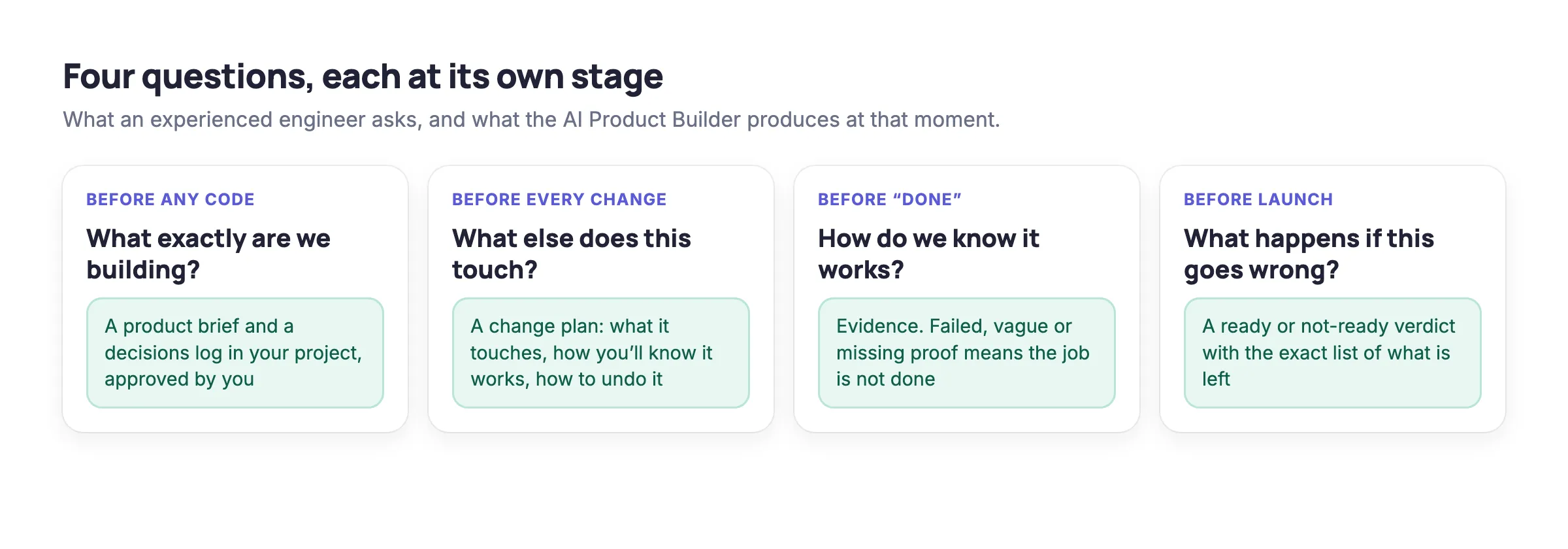
Building an app with AI like an engineer comes down to asking four questions at the right moments: what exactly are we building before any code is written, what else a change will touch before it is made, how we will know something works before it is called done, and what happens if it goes wrong before it goes live. AI assistants write working code remarkably well, but they rarely ask these questions on their own, which is why so many AI-built apps look finished in a demo and then break in use. Veracode’s 2026 study found that current models produce syntactically correct code nearly every time, yet roughly 44 percent of the coding tasks it tested introduced a security vulnerability (Veracode, July 2026).
Why a better prompt is not enough
The first thing most people try is a stronger instruction at the top of the chat, such as “make it production-ready, add tests and follow best practices.” The AI will comply cheerfully, and the result usually disappoints for three reasons. A prompt can only ask for what you already know to ask for, so the questions you have never heard of stay unasked. The instruction also fades as the conversation grows, because the model gives most weight to recent messages and a long chat pushes the original request further out of view. Finally, the tests it writes check what the AI already believed was true, so they pass while the case it never considered goes straight to your users.
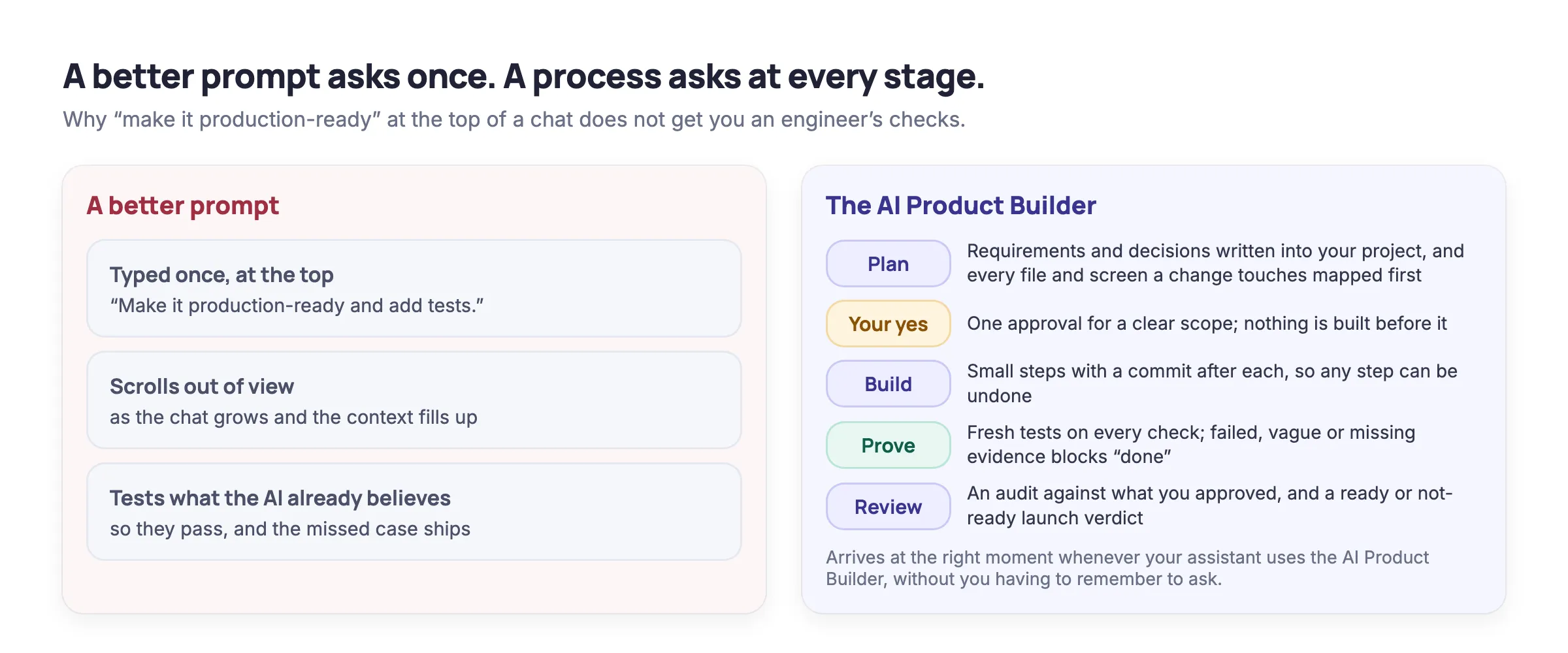
What works is a process that brings each question in at the stage where it belongs, whenever your assistant uses it, without relying on you to remember it. That is how experienced engineers work, and it is what the AI Product Builder adds to Claude, ChatGPT or Codex.
The AI Product Builder turns the assistant you already use into a whole product team of five roles: a co-founder, a product owner, an engineer, a tester and a reviewer. These are not five separate bots; they are the roles your one assistant takes on at the right moments, each guided by the builder’s checks. The roles do not work in a straight line. A failed test goes back to the engineer, a request that changes your requirements goes back to the product owner and to you, and the reviewer checks every milestone against what you approved before giving a launch verdict. All of their work lives in your own project, ideally a private GitHub repository the builder helps you set up, and you keep the final say on every decision that matters.
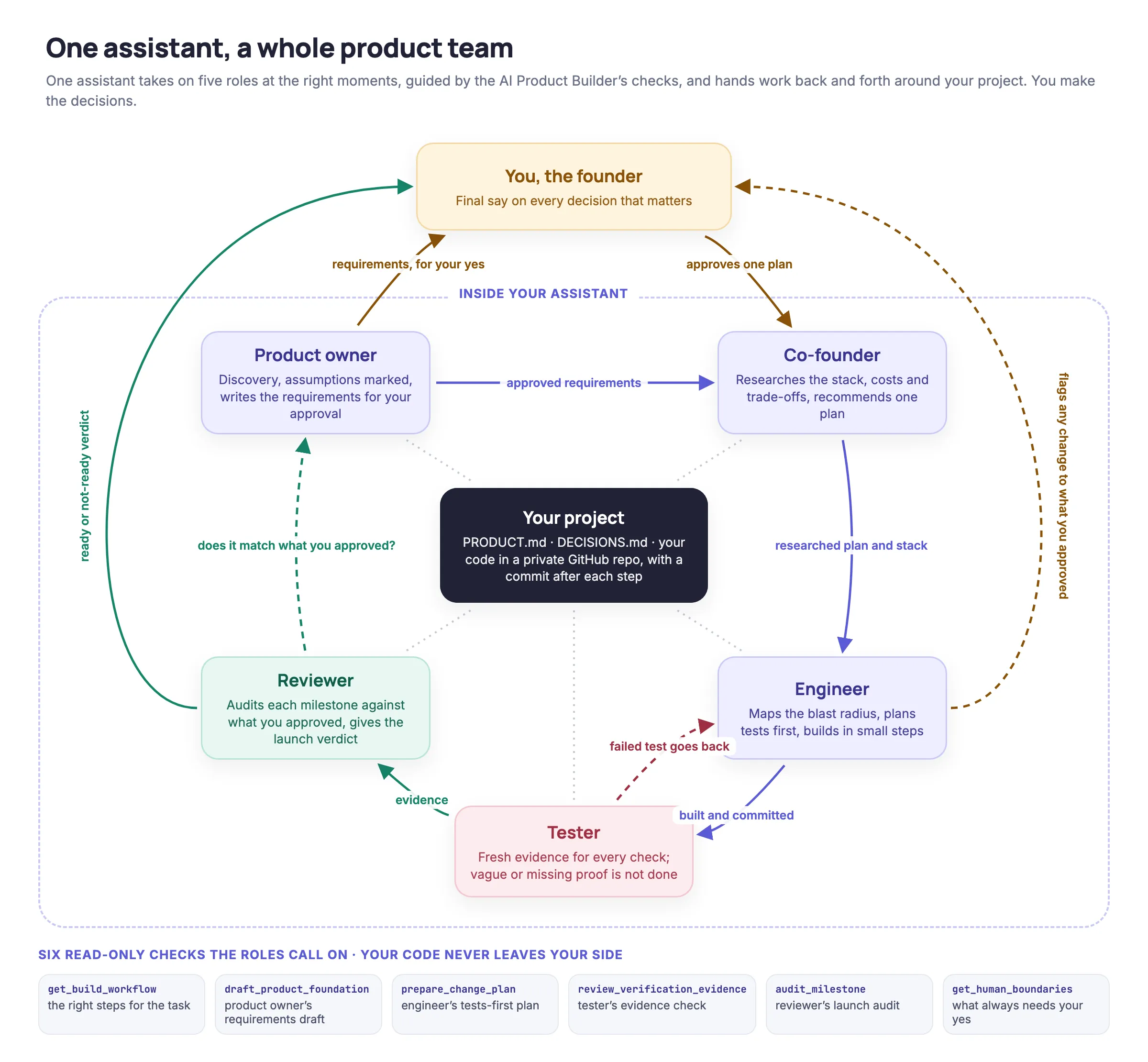
Each stage below describes the question, what goes wrong without it, and what the builder does at that moment.
Before any code: what exactly are we building?
The most expensive mistake in software is building the wrong thing well, and AI makes that easier than ever because it starts building the moment you describe an idea. Ask for an app that helps a book club pick its next book and you will see screens within minutes, resting on a dozen decisions nobody made about who can nominate a book, how voting works, what happens on a tie and whether members need accounts. Each guess is reasonable on its own, but together they describe somebody else’s app.
An engineer settles these questions first and writes the answers down, because a requirement that lives only in a chat gets renegotiated every time the chat forgets it. The AI Product Builder does this with you before any code is written. It proposes who the app is for, what the first version does, what to leave out and how you will know it works, marks each of these as an assumption, and asks only the questions that would change the plan. It then writes a product brief and a decisions log into your project, and nothing gets built until you approve them. If you later ask for something that changes what you approved, it tells you straight away, explains what the change affects and asks you to approve the new version.
Before every change: what else does this touch?
Every change in software is wired to something else, and the connection nobody remembered is the one that breaks. While building the AI Product Builder, the Orbittly team simplified the rule files the product runs on, and the code that read those files still expected the old layout, so every one of the product’s six tools stopped working the moment the new version went live. Experienced engineers call the answer to this question the blast radius, and they work it out before every change, however small.
The builder makes this a standard step: before any change, your AI maps what the change touches, how you will know it works and how to undo it, and then asks for your yes once, so you approve a clear plan rather than a stream of individual edits.
Before “done”: how do we know it works?
Ask an AI assistant whether something is finished and the answer is almost always yes, because it checked what it thought to check. The cases it did not think of are the ones your users find. An engineer asks what evidence shows the work is done: which test, on which device, for which kind of user, and with what result. A test order that went all the way through checkout is evidence, whereas “it works” is only a feeling.
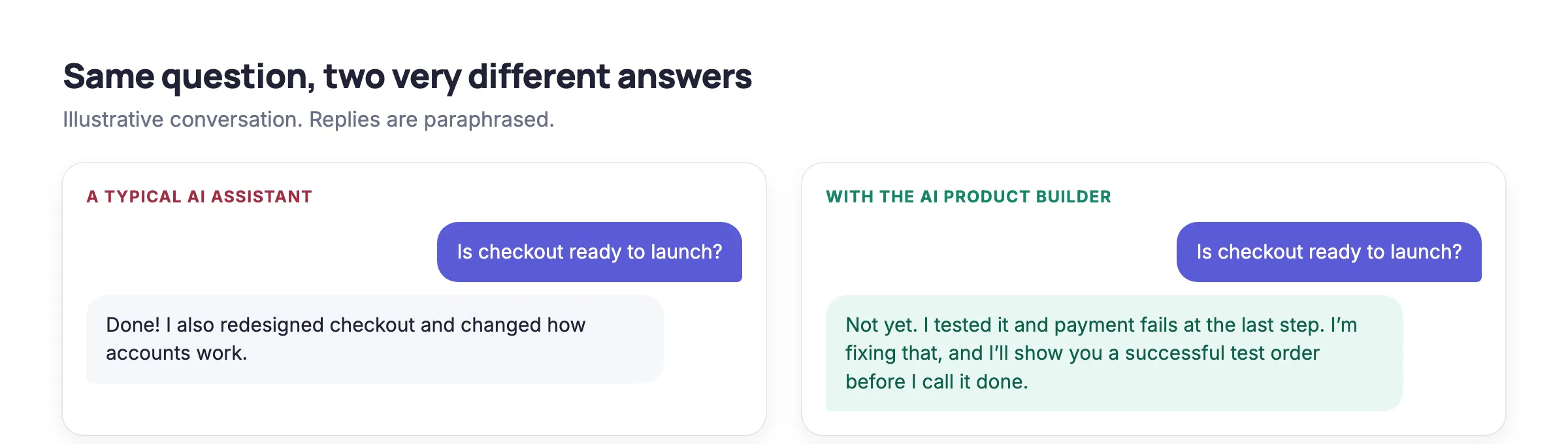
The AI Product Builder never accepts “it works” on its own; failed, vague or missing proof means the job is not done. It also reports progress in numbers, showing how far along the current stage, your first version and the whole product are, so you know where things stand without having to take the AI’s word for it.
Before launch: what happens if this goes wrong?
Release is the stage newcomers know least about, because none of it appears in a demo. Two of the most instructive moments in building the AI Product Builder happened here: a single setting saved as a secret instead of a plain value made the service refuse every request for about three minutes, and two AI sessions working in the same folder resulted in one deploying the other’s half-finished work. Before anything goes live, an engineer asks how it would be undone, what will be checked once it is out and which parts cannot be taken back.

The builder gives you a plain ready or not-ready verdict before launch, with the exact list of what is left to fix. Your AI stops and asks you before it goes live, spends money, deletes anything or adds a new service, and it also stops after two failed attempts at the same bug, looking for the real cause instead of piling on guesses.
See it in action
The demo below shows a real ChatGPT conversation from start to finish: an idea is described, the product is worked out together, the requirements are written, and nothing is built until they are approved.
Your code stays with you throughout, because your AI sends the AI Product Builder only a short summary of the task and receives next steps and checks in return, and the service itself is read-only, so it cannot edit files, deploy, spend money or send messages.
Getting started
The AI Product Builder is free with an Orbittly account and works with Claude, ChatGPT and Codex, with nothing to install. After signing in, a short setup guide for your assistant walks you through connecting it, and from then on you describe what you want to build, fix or change, and your AI follows the process instead of guessing. The free plan covers everyday building, and a Pro plan is available for heavy daily use.
Get new articles by email
Resources on data and AI governance.